
Please follow the below steps for reset password on your Windows Server Machine.
Option ONE:
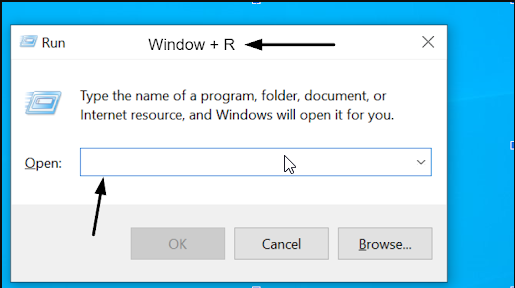
1. Press Windows + R to open the Run dialog box.
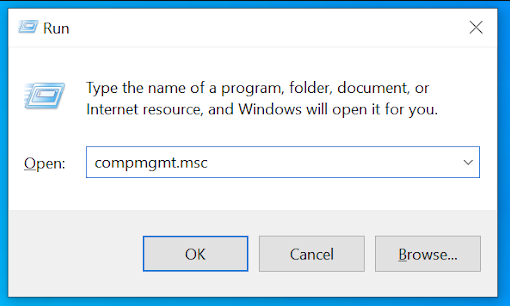
2. Type compmgmt.msc and press Enter.
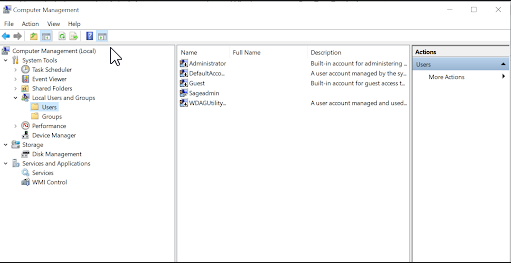
3. In the Computer Management console, expand Local Users and Groups > Users.
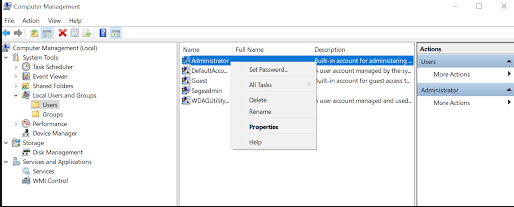
4. Right-click the Administrator user account and select Set Password.
5. Type the new password in the New password and Confirm new password fields.
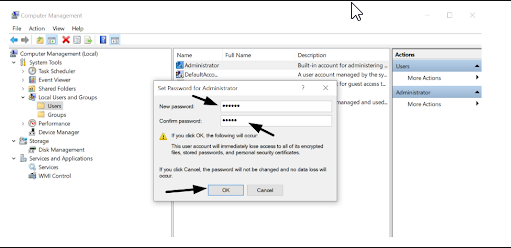
6. Click OK to change the password.
Option Two:
Changing password through command prompt for windows 2008 or windows 2012 VPS.
Please use below command to change password from command prompt.
net user "yourusername" "yourpassword"
Example: net user Administrator hdgsydgd$8545
